Terminal > Getting started
Keyboard Shortcuts
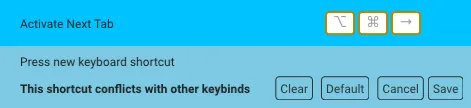
# Keyboard Shortcuts Warp opens with a shortcut screen showing some of the most commonly used keyboard shortcuts. Hide the shortcut screen by clicking the x button. Quickly view keyboard shortcuts via the [Command Palette](/terminal/command-palette/) or the Resource Center keyboard shortcut sidebar. ## Custom keyboard shortcuts Set custom, clear, or default keyboard shortcuts by navigating to **Settings** > **Keyboard shortcuts**. Search through the re-mappable actions or existing shortcuts using the search bar. Remap the keyboard shortcuts using a file. See our [keysets repository](https://github.com/warpdotdev/keysets/tree/main) for instructions. :::note On macOS, [system keyboard shortcuts](https://support.apple.com/en-us/HT201236) like `⌘+Esc`, `` ⌘+` ``, `⌘+Tab`, `⌘+.`, and `⌘+~` need to be [unbound](https://support.apple.com/guide/mac-help/keyboard-shortcuts-mchlp2262/mac) before you can use them in Warp. ::: :::caution Keybinds that conflict with others are highlighted with an orange border. ::: <figure>  <figcaption>An example of a keybinding conflict warning.</figcaption> </figure> ## All available shortcuts <Tabs> <TabItem label="macOS"> **Warp Essentials** | Shortcut | Command | Action | | -------------- | ---------------------------- | ---------------------------------------------- | | `⌘+D` | Split Pane Right | `pane_group:add_right` | | `Ctrl+⌘+L` | Launch Configuration Palette | `workspace:toggle_launch_config_palette` | | `Ctrl+⌘+T` | Open Theme Picker | `workspace:show_theme_chooser` | | `Ctrl+R` | Command Search | `workspace:show_command_search` | | `Ctrl+Shift+R` | Workflows | `input:toggle_workflows` | | `` Ctrl+` `` | Generate | `input:toggle_natural_language_command_search` | | `⌘+L` | Focus Terminal Input | `terminal:focus_input` | | `Ctrl+I` | Warpify Subshell | `terminal:warpify_subshell` | | `⌘+\` | Warp Drive | `workspace:toggle_warp_drive` | | `⌘+O` | File search | | | `⌘+P` | Open Command Palette | **Blocks** | Shortcut | Command | Action | | ----------------- | --------------------------------- | ------------------------------------------------------ | | `Option+↓` | Select the Closest Bookmark Down | `terminal:select_bookmark_down` | | `Option+Shift+⌘+C` | Copy Command Output | `terminal:copy_outputs` | | `Option+↑` | Select the Closest Bookmark Up | `terminal:select_bookmark_up` | | `⌘+A` | Select All Blocks | `terminal:select_all_blocks` | | `⌘+K` | Clear Blocks | `terminal:clear_blocks` | | `⌘+B` | Bookmark Selected Block | `terminal:bookmark_selected_block` | | `⌘+↓` | Select Next Block | `terminal:select_next_block` | | `⌘+I` | Reinput Selected Commands | `terminal:reinput_commands` | | `⌘+↑` | Select Previous Block | `terminal:select_previous_block` | | `Ctrl+M` | Open Block Context Menu | `terminal:open_block_list_context_menu_via_keybinding` | | `Shift+⌘+C` | Copy Command | `terminal:copy_commands` | | `Shift+⌘+I` | Reinput Selected Commands as Root | `terminal:reinput_commands_with_sudo` | | `Shift+⌘+S` | Share Selected Block | `terminal:open_share_block_modal` | | `Shift+↓` | Expand Selected Blocks Below | `terminal:expand_block_selection_below` | | `Shift+↑` | Expand Selected Blocks Above | `terminal:expand_block_selection_above` | **Scrolling** | Shortcut | Command | Action | | ---------------- | -------------------------------------------- | --------------------------------------------------------- | | `Page Up` | Scroll Up One Page | `terminal:scroll_up_one_page` | | `Page Down` | Scroll Down One Page | `terminal:scroll_down_one_page` | | `Home` | Scroll to Top | | | `End` | Scroll to Bottom | | | `Shift+⌘+↑` | Scroll to Top of Selected Block | `terminal:scroll_to_top_of_selected_block` | | `Shift+⌘+↓` | Scroll to Bottom of Selected Block | `terminal:scroll_to_bottom_of_selected_block` | | | Scroll Terminal Output Up One Line | `terminal:scroll_up_one_line` | | | Scroll Terminal Output Down One Line | `terminal:scroll_down_one_line` | :::note "Scroll Terminal Output Up/Down One Line" has no default keybinding. You can assign one in **Settings** > **Keyboard shortcuts** or trigger it from the [Command Palette](/terminal/command-palette/). During long-running or full-screen commands, `Page Up`, `Page Down`, `Home`, and `End` are forwarded to the running program. ::: **Input Editor** | Shortcut | Command | Action | | ----------------- | ----------------------------------------- | ------------------------------------------ | | `Option+Backspace` | Delete Word Left | `editor:delete_word_left` | | `Option+⌘+F` | Fold Selected Ranges | `editor_view:fold_selected_ranges` | | `Option+⌘+[` | Fold | `editor_view:fold` | | `Option+⌘+]` | Unfold | `editor_view:unfold` | | `Option+Delete` | Delete Word Right | `editor:delete_word_right` | | `⌘+A` | Select All | `editor_view:select_all` | | `⌘+Backspace` | Delete All Left | `editor_view:delete_all_left` | | `⌘+Delete` | Delete All Right | `editor_view:delete_all_right` | | `⌘+↓` | Move Cursor to the Bottom | `editor_view:cmd_down` | | `⌘+I` | Inspect Command | `editor_view:inspect_command` | | `⌘+←` | Home | `editor_view:home` | | `⌘+→` | End | `editor_view:end` | | `Ctrl+A` | Move to Start of Line | `editor_view:move_to_line_start` | | `Ctrl+B` | Move Cursor Left | `editor_view:left` | | `Ctrl+C` | Clear Command Editor | `editor_view:clear_buffer` | | `Ctrl+D` | Delete | `editor_view:delete` | | `Ctrl+E` | Move to End of Line | `editor_view:move_to_line_end` | | `Ctrl+F` | Move Cursor Right / Accept Autosuggestion | `editor_view:right` | | `Ctrl+G` | Add Selection for Next Occurrence | `editor_view:add_next_occurrence` | | `Ctrl+H` | Remove the Previous Character | `editor_view:backspace` | | `Ctrl+J` | Insert Newline | `editor_view:insert_newline` | | `Ctrl+K` | Cut All Right | `editor_view:cut_all_right` | | `Ctrl+L` | Clear Screen | `input:clear_screen` | | `Ctrl+N` | Move Cursor Down | `editor_view:down` | | `Ctrl+P` | Move Cursor Up | `editor_view:up` | | `Ctrl+Shift+A` | Select to Start of Line | `editor_view:select_to_line_start` | | `Ctrl+Shift+B` | Select One Character to the Left | `editor_view:select_left` | | `Ctrl+Shift+↓` | Add Cursor Below | `editor_view:add_cursor_below` | | `Ctrl+Shift+E` | Select to End of Line | `editor:select_to_line_end` | | `⌘+Z` | Undo | | | `⌘+Shift+Z` | Redo | | | `Ctrl+Shift+F` | Select One Character to the Right | `editor_view:select_right` | | `Ctrl+Shift+N` | Select Down | `editor_view:select_down` | | `Ctrl+Shift+P` | Select Up | `editor_view:select_up` | | `Ctrl+Shift+↑` | Add Cursor Above | `editor_view:add_cursor_above` | | `Ctrl+U` | Copy and Clear Selected Lines | `editor_view:clear_and_copy_lines` | | `Ctrl+W` | Cut Word Left | `editor_view:cut_word_left` | | `Meta+.` | Insert Last Word of Previous Command | `editor:insert_last_word_previous_command` | | `Meta+A` | Move to the Start of the Paragraph | `editor_view:move_to_paragraph_start` | | `Meta+B` | Move Backward One Word | `editor_view:move_backward_one_word` | | `Meta+D` | Cut Word Right | `editor_view:cut_word_right` | | `Meta+E` | Move to the End of the Paragraph | `editor_view:move_to_paragraph_end` | | `Meta+F` | Move Forward One Word | `editor_view:move_forward_one_word` | | `Ctrl+Option+←` | Move Backward One Subword | `editor_view:move_backward_one_subword` | | `Ctrl+Option+→` | Move Forward One Subword | `editor_view:move_forward_one_subword` | | `Shift+⌘+K` | Clear Selected Lines | `editor_view:clear_lines` | | `Shift+Meta+<` | Move to the Start of the Buffer | `editor_view:move_to_buffer_start` | | `Shift+Meta+>` | Move to the End of the Buffer | `editor_view:move_to_buffer_end` | | `Shift+Meta+B` | Select One Word to the Left | `editor_view:select_left_by_word` | | `Shift+Meta+F` | Select One Word to the Right | `editor_view:select_right_by_word` | **Terminal** | Shortcut | Command | Action | | ----------------- | ------------------------------------------------- | -------------------------------------------- | | `Option+⌘+↓` | Switch Panes Down | `pane_group:navigate_down` | | `Option+⌘+←` | Switch Panes Left | `pane_group:navigate_left` | | `Option+⌘+→` | Switch Panes Right | `pane_group:navigate_right` | | `Option+⌘+↑` | Switch Panes Up | `pane_group:navigate_up` | | `Option+⌘+V` | \[a11y] Set Concise Accessibility Announcements | `workspace:set_a11y_concise_verbosity_level` | | `Option+⌘+V` | \[a11y] Set Verbose Accessibility Announcements | `workspace:set_a11y_verbose_verbosity_level` | | `⌘+,` | Open Settings | `workspace:show_settings` | | `⌘+,` | Open Settings: Account | `workspace:show_settings_account_page` | | `⌘+G` | Find the Next Occurrence of Your Search Query | `find:find_next_occurrence` | | `⌘+P` | Toggle Command Palette | `workspace:toggle_command_palette` | | | Toggle Mouse Reporting | `workspace:toggle_mouse_reporting` | | `⌘+[` | Activate Previous Pane | `pane_group:navigate_prev` | | `⌘+]` | Activate Next Pane | `pane_group:navigate_next` | | `Ctrl+⌘+↓` | Resize Pane > Move Divider Down | `pane_group:resize_down` | | `Ctrl+⌘+K` | Open Keybindings Editor | `workspace:show_keybinding_settings` | | `Ctrl+⌘+←` | Resize Pane > Move Divider Left | `pane_group:resize_left` | | `Ctrl+⌘+→` | Resize Pane > Move Divider Right | `pane_group:resize_right` | | `Ctrl+⌘+↑` | Resize Pane > Move Divider Up | `pane_group:resize_up` | | `Ctrl+Shift+?` | Open Resource Center | `workspace:toggle_resource_center` | | `Shift+⌘+D` | Split Pane Down | `pane_group:add_down` | | `Shift+⌘+Enter` | Toggle Maximize Active Pane | `pane_group:toggle_maximize_pane` | | `Shift+⌘+G` | Find the Previous Occurrence of Your Search Query | `find:find_prev_occurrence` | | `Shift+⌘+P` | Toggle Navigation Palette | `workspace:toggle_navigation_palette` | **Fundamentals** | Shortcut | Command | Action | | ------------------ | -------------------------- | -------------------------------- | | `⌘+-` | Decrease Font Size | `workspace:decrease_font_size` | | `⌘+0` | Reset Font Size to Default | `workspace:reset_font_size` | | `⌘+1` | Switch to 1st Tab | `workspace:activate_first_tab` | | `⌘+2` | Switch to 2nd Tab | `workspace:activate_second_tab` | | `⌘+3` | Switch to 3rd Tab | `workspace:activate_third_tab` | | `⌘+4` | Switch to 4th Tab | `workspace:activate_fourth_tab` | | `⌘+5` | Switch to 5th Tab | `workspace:activate_fifth_tab` | | `⌘+6` | Switch to 6th Tab | `workspace:activate_sixth_tab` | | `⌘+7` | Switch to 7th Tab | `workspace:activate_seventh_tab` | | `⌘+8` | Switch to 8th Tab | `workspace:activate_eighth_tab` | | `⌘+9` | Switch to Last Tab | `workspace:activate_last_tab` | | `⌘+=` | Increase Font Size | `workspace:increase_font_size` | | `⌘+C` | Copy | `terminal:copy` | | `⌘+F` | Find | `terminal:find` | | `⌘+V` | Paste | `terminal:paste` | | `⌘+T` | Open New Tab | `workspace:new_tab` | | `Shift+⌘+T` | Reopen Closed Tab | `app:reopen_closed_session` | | `Ctrl+Shift+←` | Move Tab Left | `workspace:move_tab_left` | | `Ctrl+Shift+→` | Move Tab Right | `workspace:move_tab_right` | | `Shift+⌘+{` | Activate Previous Tab | `workspace:activate_prev_tab` | | `Shift+⌘+}` | Activate Next Tab | `workspace:activate_next_tab` | </TabItem> <TabItem label="Windows"> **Warp Essentials** | Shortcut | Command | Action | | -------------- | ---------------------------- | ---------------------------------------------- | | `Ctrl+Shift+D` | Split Pane Right | `pane_group:add_right` | | | Launch Configuration Palette | `workspace:toggle_launch_config_palette` | | | Open Theme Picker | `workspace:show_theme_chooser` | | `Ctrl+R` | Command Search | `workspace:show_command_search` | | `Ctrl+Shift+R` | Workflows | `input:toggle_workflows` | | `` Ctrl+` `` | Generate | `input:toggle_natural_language_command_search` | | `Ctrl+Shift+L` | Focus Terminal Input | `terminal:focus_input` | | `Ctrl+I` | Warpify Subshell | `terminal:warpify_subshell` | | `Ctrl+Shift+\` | Warp Drive | `workspace:toggle_warp_drive` | **Blocks** | Shortcut | Command | Action | | ------------------ | --------------------------------- | ------------------------------------------------------ | | `Alt+↓` | Select the Closest Bookmark Down | `terminal:select_bookmark_down` | | `Ctrl+Shift+Alt+C` | Copy Command Output | `terminal:copy_outputs` | | `Alt+↑` | Select the Closest Bookmark Up | `terminal:select_bookmark_up` | | `Ctrl+Shift+A` | Select All Blocks | `terminal:select_all_blocks` | | `Ctrl+Shift+K` | Clear Blocks | `terminal:clear_blocks` | | `Ctrl+Shift+B` | Bookmark Selected Block | `terminal:bookmark_selected_block` | | `Ctrl+↓` | Select Next Block | `terminal:select_next_block` | | `Ctrl+Shift+I` | Reinput Selected Commands | `terminal:reinput_commands` | | `Ctrl+↑` | Select Previous Block | `terminal:select_previous_block` | | | Open Block Context Menu | `terminal:open_block_list_context_menu_via_keybinding` | | `Ctrl+Shift+C` | Copy Command | `terminal:copy_commands` | | | Reinput Selected Commands as Root | `terminal:reinput_commands_with_sudo` | | `Ctrl+Shift+S` | Share Selected Block | `terminal:open_share_block_modal` | | `Shift+↓` | Expand Selected Blocks Below | `terminal:expand_block_selection_below` | | `Shift+↑` | Expand Selected Blocks Above | `terminal:expand_block_selection_above` | **Scrolling** | Shortcut | Command | Action | | ------------------ | -------------------------------------------- | --------------------------------------------------------- | | `Page Up` | Scroll Up One Page | `terminal:scroll_up_one_page` | | `Page Down` | Scroll Down One Page | `terminal:scroll_down_one_page` | | `Home` | Scroll to Top | | | `End` | Scroll to Bottom | | | `Ctrl+Shift+↑` | Scroll to Top of Selected Block | `terminal:scroll_to_top_of_selected_block` | | `Ctrl+Shift+↓` | Scroll to Bottom of Selected Block | `terminal:scroll_to_bottom_of_selected_block` | | | Scroll Terminal Output Up One Line | `terminal:scroll_up_one_line` | | | Scroll Terminal Output Down One Line | `terminal:scroll_down_one_line` | :::note "Scroll Terminal Output Up/Down One Line" has no default keybinding. You can assign one in **Settings** > **Keyboard shortcuts** or trigger it from the [Command Palette](/terminal/command-palette/). During long-running or full-screen commands, `Page Up`, `Page Down`, `Home`, and `End` are forwarded to the running program. ::: **Input Editor** | Shortcut | Command | Action | | ------------------ | ----------------------------------------- | ------------------------------------------ | | `Ctrl+Backspace` | Delete Word Left | `editor:delete_word_left` | | `Ctrl+Alt+F` | Fold Selected Ranges | `editor_view:fold_selected_ranges` | | `Ctrl+Alt+[` | Fold | `editor_view:fold` | | `Ctrl+Alt+]` | Unfold | `editor_view:unfold` | | `Ctrl+Delete` | Delete Word Right | `editor:delete_word_right` | | `Ctrl+A` | Select All | `editor_view:select_all` | | `Ctrl+Y` | Delete All Left | `editor_view:delete_all_left` | | | Delete All Right | `editor_view:delete_all_right` | | `Ctrl+End` | Move Cursor to the Bottom | `editor_view:cmd_down` | | `Ctrl+I` | Inspect Command | `editor_view:inspect_command` | | `Home` | Home | `editor_view:home` | | `End` | End | `editor_view:end` | | `Ctrl+A` | Move to Start of Line | `editor_view:move_to_line_start` | | `Ctrl+B` | Move Cursor Left | `editor_view:left` | | `Ctrl+C` | Clear Command Editor | `editor_view:clear_buffer` | | `Ctrl+D` | Delete | `editor_view:delete` | | `Ctrl+E` | Move to End of Line | `editor_view:move_to_line_end` | | `Ctrl+F` | Move Cursor Right / Accept Autosuggestion | `editor_view:right` | | `Ctrl+G` | Add Selection for Next Occurrence | `editor_view:add_next_occurrence` | | `Ctrl+H` | Remove the Previous Character | `editor_view:backspace` | | `Ctrl+J` | Insert Newline | `editor_view:insert_newline` | | `Ctrl+K` | Cut All Right | `editor_view:cut_all_right` | | `Ctrl+L` | Clear Screen | `input:clear_screen` | | `Ctrl+N` | Move Cursor Down | `editor_view:down` | | `Ctrl+P` | Move Cursor Up | `editor_view:up` | | | Select to Start of Line | `editor_view:select_to_line_start` | | `Ctrl+Shift+B` | Select One Character to the Left | `editor_view:select_left` | | `Ctrl+Shift+↓` | Add Cursor Below | `editor_view:add_cursor_below` | | | Select to End of Line | `editor:select_to_line_end` | | `Ctrl+Z` | Undo | | | `Ctrl+Shift+Z` | Redo | | | `Ctrl+Shift+F` | Select One Character to the Right | `editor_view:select_right` | | | Select Down | `editor_view:select_down` | | `Ctrl+Shift+P` | Select Up | `editor_view:select_up` | | `Ctrl+Shift+↑` | Add Cursor Above | `editor_view:add_cursor_above` | | `Ctrl+U` | Copy and Clear Selected Lines | `editor_view:clear_and_copy_lines` | | `Ctrl+W` | Cut Word Left | `editor_view:cut_word_left` | | `Meta+.` | Insert Last Word of Previous Command | `editor:insert_last_word_previous_command` | | `Meta+A` | Move to the Start of the Paragraph | `editor_view:move_to_paragraph_start` | | `Ctrl+←` | Move Backward One Word | `editor_view:move_backward_one_word` | | `Alt+D` | Cut Word Right | `editor_view:cut_word_right` | | `Meta+E` | Move to the End of the Paragraph | `editor_view:move_to_paragraph_end` | | `Ctrl+→` | Move Forward One Word | `editor_view:move_forward_one_word` | | `Ctrl+Alt+←` | Move Backward One Subword | `editor_view:move_backward_one_subword` | | `Ctrl+Alt+→` | Move Forward One Subword | `editor_view:move_forward_one_subword` | | `Shift+Meta+<` | Move to the Start of the Buffer | `editor_view:move_to_buffer_start` | | `Shift+Meta+>` | Move to the End of the Buffer | `editor_view:move_to_buffer_end` | | `Ctrl+Shift+←` | Select One Word to the Left | `editor_view:select_left_by_word` | | `Ctrl+Shift+→` | Select One Word to the Right | `editor_view:select_right_by_word` | **Terminal** | Shortcut | Command | Action | | ------------------ | ------------------------------------------------- | -------------------------------------------- | | `Ctrl+Alt+↓` | Switch Panes Down | `pane_group:navigate_down` | | `Ctrl+Alt+←` | Switch Panes Left | `pane_group:navigate_left` | | `Ctrl+Alt+→` | Switch Panes Right | `pane_group:navigate_right` | | `Ctrl+Alt+↑` | Switch Panes Up | `pane_group:navigate_up` | | `Ctrl+Alt+V` | \[a11y] Set Concise Accessibility Announcements | `workspace:set_a11y_concise_verbosity_level` | | `Ctrl+Alt+V` | \[a11y] Set Verbose Accessibility Announcements | `workspace:set_a11y_verbose_verbosity_level` | | `Ctrl+,` | Open Settings | `workspace:show_settings` | | `Ctrl+,` | Open Settings: Account | `workspace:show_settings_account_page` | | `F3` | Find the Next Occurrence of Your Search Query | `find:find_next_occurrence` | | `Ctrl+Shift+P` | Toggle Command Palette | `workspace:toggle_command_palette` | | | Toggle Mouse Reporting | `workspace:toggle_mouse_reporting` | | `Ctrl+Shift+[` | Activate Previous Pane | `pane_group:navigate_prev` | | `Ctrl+Shift+]` | Activate Next Pane | `pane_group:navigate_next` | | | Resize Pane > Move Divider Down | `pane_group:resize_down` | | `Ctrl+⌘+K` | Open Keybindings Editor | `workspace:show_keybinding_settings` | | | Resize Pane > Move Divider Left | `pane_group:resize_left` | | | Resize Pane > Move Divider Right | `pane_group:resize_right` | | | Resize Pane > Move Divider Up | `pane_group:resize_up` | | `Ctrl+Shift+/` | Open Resource Center | `workspace:toggle_resource_center` | | `Ctrl+Shift+E` | Split Pane Down | `pane_group:add_down` | | `Ctrl+Shift+Enter` | Toggle Maximize Active Pane | `pane_group:toggle_maximize_pane` | | `Shift+F3` | Find the Previous Occurrence of Your Search Query | `find:find_prev_occurrence` | | | Toggle Navigation Palette | `workspace:toggle_navigation_palette` | **Fundamentals** | Shortcut | Command | Action | | ------------------ | -------------------------- | -------------------------------- | | `Ctrl+-` | Decrease Font Size | `workspace:decrease_font_size` | | `Ctrl+0` | Reset Font Size to Default | `workspace:reset_font_size` | | `Ctrl+1` | Switch to 1st Tab | `workspace:activate_first_tab` | | `Ctrl+2` | Switch to 2nd Tab | `workspace:activate_second_tab` | | `Ctrl+3` | Switch to 3rd Tab | `workspace:activate_third_tab` | | `Ctrl+4` | Switch to 4th Tab | `workspace:activate_fourth_tab` | | `Ctrl+5` | Switch to 5th Tab | `workspace:activate_fifth_tab` | | `Ctrl+6` | Switch to 6th Tab | `workspace:activate_sixth_tab` | | `Ctrl+7` | Switch to 7th Tab | `workspace:activate_seventh_tab` | | `Ctrl+8` | Switch to 8th Tab | `workspace:activate_eighth_tab` | | `Ctrl+9` | Switch to Last Tab | `workspace:activate_last_tab` | | `Ctrl+=` | Increase Font Size | `workspace:increase_font_size` | | `Ctrl+Shift+C` | Copy | `terminal:copy` | | `Ctrl+Shift+F` | Find | `terminal:find` | | `Ctrl+Shift+V` | Paste | `terminal:paste` | | `Ctrl+Shift+T` | Open New Tab | `workspace:new_tab` | | `Ctrl+Alt+T` | Reopen Closed Tab | `app:reopen_closed_session` | | `Ctrl+Shift+←` | Move Tab Left | `workspace:move_tab_left` | | `Ctrl+Shift+→` | Move Tab Right | `workspace:move_tab_right` | | `Ctrl+Page Up` | Activate Previous Tab | `workspace:activate_prev_tab` | | `Ctrl+Page Down` | Activate Next Tab | `workspace:activate_next_tab` | </TabItem> <TabItem label="Linux"> **Warp Essentials** | Shortcut | Command | Action | | -------------- | ---------------------------- | ---------------------------------------------- | | `Ctrl+Shift+D` | Split Pane Right | `pane_group:add_right` | | | Launch Configuration Palette | `workspace:toggle_launch_config_palette` | | | Open Theme Picker | `workspace:show_theme_chooser` | | `Ctrl+R` | Command Search | `workspace:show_command_search` | | `Ctrl+Shift+R` | Workflows | `input:toggle_workflows` | | `` Ctrl+` `` | Generate | `input:toggle_natural_language_command_search` | | `Ctrl+Shift+L` | Focus Terminal Input | `terminal:focus_input` | | `Ctrl+I` | Warpify Subshell | `terminal:warpify_subshell` | | `Ctrl+Shift+\` | Warp Drive | `workspace:toggle_warp_drive` | **Blocks** | Shortcut | Command | Action | | ------------------ | --------------------------------- | ------------------------------------------------------ | | `Alt+↓` | Select the Closest Bookmark Down | `terminal:select_bookmark_down` | | `Ctrl+Shift+Alt+C` | Copy Command Output | `terminal:copy_outputs` | | `Alt+↑` | Select the Closest Bookmark Up | `terminal:select_bookmark_up` | | `Ctrl+Shift+A` | Select All Blocks | `terminal:select_all_blocks` | | `Ctrl+Shift+K` | Clear Blocks | `terminal:clear_blocks` | | `Ctrl+Shift+B` | Bookmark Selected Block | `terminal:bookmark_selected_block` | | `Ctrl+↓` | Select Next Block | `terminal:select_next_block` | | `Ctrl+Shift+I` | Reinput Selected Commands | `terminal:reinput_commands` | | `Ctrl+↑` | Select Previous Block | `terminal:select_previous_block` | | | Open Block Context Menu | `terminal:open_block_list_context_menu_via_keybinding` | | `Ctrl+Shift+C` | Copy Command | `terminal:copy_commands` | | | Reinput Selected Commands as Root | `terminal:reinput_commands_with_sudo` | | `Ctrl+Shift+S` | Share Selected Block | `terminal:open_share_block_modal` | | `Shift+↓` | Expand Selected Blocks Below | `terminal:expand_block_selection_below` | | `Shift+↑` | Expand Selected Blocks Above | `terminal:expand_block_selection_above` | **Scrolling** | Shortcut | Command | Action | | ------------------ | -------------------------------------------- | --------------------------------------------------------- | | `Page Up` | Scroll Up One Page | `terminal:scroll_up_one_page` | | `Page Down` | Scroll Down One Page | `terminal:scroll_down_one_page` | | `Home` | Scroll to Top | | | `End` | Scroll to Bottom | | | `Ctrl+Shift+↑` | Scroll to Top of Selected Block | `terminal:scroll_to_top_of_selected_block` | | `Ctrl+Shift+↓` | Scroll to Bottom of Selected Block | `terminal:scroll_to_bottom_of_selected_block` | | | Scroll Terminal Output Up One Line | `terminal:scroll_up_one_line` | | | Scroll Terminal Output Down One Line | `terminal:scroll_down_one_line` | :::note "Scroll Terminal Output Up/Down One Line" has no default keybinding. You can assign one in **Settings** > **Keyboard shortcuts** or trigger it from the [Command Palette](/terminal/command-palette/). During long-running or full-screen commands, `Page Up`, `Page Down`, `Home`, and `End` are forwarded to the running program. ::: **Input Editor** | Shortcut | Command | Action | | ------------------ | ----------------------------------------- | ------------------------------------------ | | `Ctrl+Backspace` | Delete Word Left | `editor:delete_word_left` | | `Ctrl+Alt+F` | Fold Selected Ranges | `editor_view:fold_selected_ranges` | | `Ctrl+Alt+[` | Fold | `editor_view:fold` | | `Ctrl+Alt+]` | Unfold | `editor_view:unfold` | | `Ctrl+Delete` | Delete Word Right | `editor:delete_word_right` | | `Ctrl+A` | Select All | `editor_view:select_all` | | `Ctrl+Y` | Delete All Left | `editor_view:delete_all_left` | | | Delete All Right | `editor_view:delete_all_right` | | `Ctrl+End` | Move Cursor to the Bottom | `editor_view:cmd_down` | | `Ctrl+I` | Inspect Command | `editor_view:inspect_command` | | `Home` | Home | `editor_view:home` | | `End` | End | `editor_view:end` | | `Ctrl+A` | Move to Start of Line | `editor_view:move_to_line_start` | | `Ctrl+B` | Move Cursor Left | `editor_view:left` | | `Ctrl+C` | Clear Command Editor | `editor_view:clear_buffer` | | `Ctrl+D` | Delete | `editor_view:delete` | | `Ctrl+E` | Move to End of Line | `editor_view:move_to_line_end` | | `Ctrl+F` | Move Cursor Right / Accept Autosuggestion | `editor_view:right` | | `Ctrl+G` | Add Selection for Next Occurrence | `editor_view:add_next_occurrence` | | `Ctrl+H` | Remove the Previous Character | `editor_view:backspace` | | `Ctrl+J` | Insert Newline | `editor_view:insert_newline` | | `Ctrl+K` | Cut All Right | `editor_view:cut_all_right` | | `Ctrl+L` | Clear Screen | `input:clear_screen` | | `Ctrl+N` | Move Cursor Down | `editor_view:down` | | `Ctrl+P` | Move Cursor Up | `editor_view:up` | | | Select to Start of Line | `editor_view:select_to_line_start` | | `Ctrl+Shift+B` | Select One Character to the Left | `editor_view:select_left` | | `Ctrl+Shift+↓` | Add Cursor Below | `editor_view:add_cursor_below` | | | Select to End of Line | `editor:select_to_line_end` | | `Ctrl+Z` | Undo | | | `Ctrl+Shift+Z` | Redo | | | `Ctrl+Shift+F` | Select One Character to the Right | `editor_view:select_right` | | | Select Down | `editor_view:select_down` | | `Ctrl+Shift+P` | Select Up | `editor_view:select_up` | | `Ctrl+Shift+↑` | Add Cursor Above | `editor_view:add_cursor_above` | | `Ctrl+U` | Copy and Clear Selected Lines | `editor_view:clear_and_copy_lines` | | `Ctrl+W` | Cut Word Left | `editor_view:cut_word_left` | | `Meta+.` | Insert Last Word of Previous Command | `editor:insert_last_word_previous_command` | | `Meta+A` | Move to the Start of the Paragraph | `editor_view:move_to_paragraph_start` | | `Ctrl+←` | Move Backward One Word | `editor_view:move_backward_one_word` | | `Alt+D` | Cut Word Right | `editor_view:cut_word_right` | | `Meta+E` | Move to the End of the Paragraph | `editor_view:move_to_paragraph_end` | | `Ctrl+→` | Move Forward One Word | `editor_view:move_forward_one_word` | | `Ctrl+Alt+←` | Move Backward One Subword | `editor_view:move_backward_one_subword` | | `Ctrl+Alt+→` | Move Forward One Subword | `editor_view:move_forward_one_subword` | | `Shift+Meta+<` | Move to the Start of the Buffer | `editor_view:move_to_buffer_start` | | `Shift+Meta+>` | Move to the End of the Buffer | `editor_view:move_to_buffer_end` | | `Ctrl+Shift+←` | Select One Word to the Left | `editor_view:select_left_by_word` | | `Ctrl+Shift+→` | Select One Word to the Right | `editor_view:select_right_by_word` | **Terminal** | Shortcut | Command | Action | | ------------------ | ------------------------------------------------- | -------------------------------------------- | | `Ctrl+Alt+↓` | Switch Panes Down | `pane_group:navigate_down` | | `Ctrl+Alt+←` | Switch Panes Left | `pane_group:navigate_left` | | `Ctrl+Alt+→` | Switch Panes Right | `pane_group:navigate_right` | | `Ctrl+Alt+↑` | Switch Panes Up | `pane_group:navigate_up` | | `Ctrl+Alt+V` | \[a11y] Set Concise Accessibility Announcements | `workspace:set_a11y_concise_verbosity_level` | | `Ctrl+Alt+V` | \[a11y] Set Verbose Accessibility Announcements | `workspace:set_a11y_verbose_verbosity_level` | | `Ctrl+,` | Open Settings | `workspace:show_settings` | | `Ctrl+,` | Open Settings: Account | `workspace:show_settings_account_page` | | `F3` | Find the Next Occurrence of Your Search Query | `find:find_next_occurrence` | | `Ctrl+Shift+P` | Toggle Command Palette | `workspace:toggle_command_palette` | | | Toggle Mouse Reporting | `workspace:toggle_mouse_reporting` | | `Ctrl+Shift+[` | Activate Previous Pane | `pane_group:navigate_prev` | | `Ctrl+Shift+]` | Activate Next Pane | `pane_group:navigate_next` | | | Resize Pane > Move Divider Down | `pane_group:resize_down` | | `Ctrl+⌘+K` | Open Keybindings Editor | `workspace:show_keybinding_settings` | | | Resize Pane > Move Divider Left | `pane_group:resize_left` | | | Resize Pane > Move Divider Right | `pane_group:resize_right` | | | Resize Pane > Move Divider Up | `pane_group:resize_up` | | `Ctrl+Shift+/` | Open Resource Center | `workspace:toggle_resource_center` | | `Ctrl+Shift+E` | Split Pane Down | `pane_group:add_down` | | `Ctrl+Shift+Enter` | Toggle Maximize Active Pane | `pane_group:toggle_maximize_pane` | | `Shift+F3` | Find the Previous Occurrence of Your Search Query | `find:find_prev_occurrence` | | | Toggle Navigation Palette | `workspace:toggle_navigation_palette` | **Fundamentals** | Shortcut | Command | Action | | ------------------ | -------------------------- | -------------------------------- | | `Ctrl+-` | Decrease Font Size | `workspace:decrease_font_size` | | `Ctrl+0` | Reset Font Size to Default | `workspace:reset_font_size` | | `Ctrl+1` | Switch to 1st Tab | `workspace:activate_first_tab` | | `Ctrl+2` | Switch to 2nd Tab | `workspace:activate_second_tab` | | `Ctrl+3` | Switch to 3rd Tab | `workspace:activate_third_tab` | | `Ctrl+4` | Switch to 4th Tab | `workspace:activate_fourth_tab` | | `Ctrl+5` | Switch to 5th Tab | `workspace:activate_fifth_tab` | | `Ctrl+6` | Switch to 6th Tab | `workspace:activate_sixth_tab` | | `Ctrl+7` | Switch to 7th Tab | `workspace:activate_seventh_tab` | | `Ctrl+8` | Switch to 8th Tab | `workspace:activate_eighth_tab` | | `Ctrl+9` | Switch to Last Tab | `workspace:activate_last_tab` | | `Ctrl+=` | Increase Font Size | `workspace:increase_font_size` | | `Ctrl+Shift+C` | Copy | `terminal:copy` | | `Ctrl+Shift+F` | Find | `terminal:find` | | `Ctrl+Shift+V` | Paste | `terminal:paste` | | `Ctrl+Shift+T` | Open New Tab | `workspace:new_tab` | | `Ctrl+Alt+T` | Reopen Closed Tab | `app:reopen_closed_session` | | `Ctrl+Shift+←` | Move Tab Left | `workspace:move_tab_left` | | `Ctrl+Shift+→` | Move Tab Right | `workspace:move_tab_right` | | `Ctrl+Page Up` | Activate Previous Tab | `workspace:activate_prev_tab` | | `Ctrl+Page Down` | Activate Next Tab | `workspace:activate_next_tab` | </TabItem> </Tabs>Tell me about this feature: https://docs.warp.dev/getting-started/keyboard-shortcuts/View, customize, and remap keyboard shortcuts for all Warp features.
Warp opens with a shortcut screen showing some of the most commonly used keyboard shortcuts. Hide the shortcut screen by clicking the x button. Quickly view keyboard shortcuts via the Command Palette or the Resource Center keyboard shortcut sidebar.
Custom keyboard shortcuts
Section titled “Custom keyboard shortcuts”Set custom, clear, or default keyboard shortcuts by navigating to Settings > Keyboard shortcuts. Search through the re-mappable actions or existing shortcuts using the search bar.
Remap the keyboard shortcuts using a file. See our keysets repository for instructions.
All available shortcuts
Section titled “All available shortcuts”Warp Essentials
| Shortcut | Command | Action |
|---|---|---|
⌘+D | Split Pane Right | pane_group:add_right |
Ctrl+⌘+L | Launch Configuration Palette | workspace:toggle_launch_config_palette |
Ctrl+⌘+T | Open Theme Picker | workspace:show_theme_chooser |
Ctrl+R | Command Search | workspace:show_command_search |
Ctrl+Shift+R | Workflows | input:toggle_workflows |
Ctrl+` | Generate | input:toggle_natural_language_command_search |
⌘+L | Focus Terminal Input | terminal:focus_input |
Ctrl+I | Warpify Subshell | terminal:warpify_subshell |
⌘+\ | Warp Drive | workspace:toggle_warp_drive |
⌘+O | File search | |
⌘+P | Open Command Palette |
Blocks
| Shortcut | Command | Action |
|---|---|---|
Option+↓ | Select the Closest Bookmark Down | terminal:select_bookmark_down |
Option+Shift+⌘+C | Copy Command Output | terminal:copy_outputs |
Option+↑ | Select the Closest Bookmark Up | terminal:select_bookmark_up |
⌘+A | Select All Blocks | terminal:select_all_blocks |
⌘+K | Clear Blocks | terminal:clear_blocks |
⌘+B | Bookmark Selected Block | terminal:bookmark_selected_block |
⌘+↓ | Select Next Block | terminal:select_next_block |
⌘+I | Reinput Selected Commands | terminal:reinput_commands |
⌘+↑ | Select Previous Block | terminal:select_previous_block |
Ctrl+M | Open Block Context Menu | terminal:open_block_list_context_menu_via_keybinding |
Shift+⌘+C | Copy Command | terminal:copy_commands |
Shift+⌘+I | Reinput Selected Commands as Root | terminal:reinput_commands_with_sudo |
Shift+⌘+S | Share Selected Block | terminal:open_share_block_modal |
Shift+↓ | Expand Selected Blocks Below | terminal:expand_block_selection_below |
Shift+↑ | Expand Selected Blocks Above | terminal:expand_block_selection_above |
Scrolling
| Shortcut | Command | Action |
|---|---|---|
Page Up | Scroll Up One Page | terminal:scroll_up_one_page |
Page Down | Scroll Down One Page | terminal:scroll_down_one_page |
Home | Scroll to Top | |
End | Scroll to Bottom | |
Shift+⌘+↑ | Scroll to Top of Selected Block | terminal:scroll_to_top_of_selected_block |
Shift+⌘+↓ | Scroll to Bottom of Selected Block | terminal:scroll_to_bottom_of_selected_block |
| Scroll Terminal Output Up One Line | terminal:scroll_up_one_line | |
| Scroll Terminal Output Down One Line | terminal:scroll_down_one_line |
Input Editor
| Shortcut | Command | Action |
|---|---|---|
Option+Backspace | Delete Word Left | editor:delete_word_left |
Option+⌘+F | Fold Selected Ranges | editor_view:fold_selected_ranges |
Option+⌘+[ | Fold | editor_view:fold |
Option+⌘+] | Unfold | editor_view:unfold |
Option+Delete | Delete Word Right | editor:delete_word_right |
⌘+A | Select All | editor_view:select_all |
⌘+Backspace | Delete All Left | editor_view:delete_all_left |
⌘+Delete | Delete All Right | editor_view:delete_all_right |
⌘+↓ | Move Cursor to the Bottom | editor_view:cmd_down |
⌘+I | Inspect Command | editor_view:inspect_command |
⌘+← | Home | editor_view:home |
⌘+→ | End | editor_view:end |
Ctrl+A | Move to Start of Line | editor_view:move_to_line_start |
Ctrl+B | Move Cursor Left | editor_view:left |
Ctrl+C | Clear Command Editor | editor_view:clear_buffer |
Ctrl+D | Delete | editor_view:delete |
Ctrl+E | Move to End of Line | editor_view:move_to_line_end |
Ctrl+F | Move Cursor Right / Accept Autosuggestion | editor_view:right |
Ctrl+G | Add Selection for Next Occurrence | editor_view:add_next_occurrence |
Ctrl+H | Remove the Previous Character | editor_view:backspace |
Ctrl+J | Insert Newline | editor_view:insert_newline |
Ctrl+K | Cut All Right | editor_view:cut_all_right |
Ctrl+L | Clear Screen | input:clear_screen |
Ctrl+N | Move Cursor Down | editor_view:down |
Ctrl+P | Move Cursor Up | editor_view:up |
Ctrl+Shift+A | Select to Start of Line | editor_view:select_to_line_start |
Ctrl+Shift+B | Select One Character to the Left | editor_view:select_left |
Ctrl+Shift+↓ | Add Cursor Below | editor_view:add_cursor_below |
Ctrl+Shift+E | Select to End of Line | editor:select_to_line_end |
⌘+Z | Undo | |
⌘+Shift+Z | Redo | |
Ctrl+Shift+F | Select One Character to the Right | editor_view:select_right |
Ctrl+Shift+N | Select Down | editor_view:select_down |
Ctrl+Shift+P | Select Up | editor_view:select_up |
Ctrl+Shift+↑ | Add Cursor Above | editor_view:add_cursor_above |
Ctrl+U | Copy and Clear Selected Lines | editor_view:clear_and_copy_lines |
Ctrl+W | Cut Word Left | editor_view:cut_word_left |
Meta+. | Insert Last Word of Previous Command | editor:insert_last_word_previous_command |
Meta+A | Move to the Start of the Paragraph | editor_view:move_to_paragraph_start |
Meta+B | Move Backward One Word | editor_view:move_backward_one_word |
Meta+D | Cut Word Right | editor_view:cut_word_right |
Meta+E | Move to the End of the Paragraph | editor_view:move_to_paragraph_end |
Meta+F | Move Forward One Word | editor_view:move_forward_one_word |
Ctrl+Option+← | Move Backward One Subword | editor_view:move_backward_one_subword |
Ctrl+Option+→ | Move Forward One Subword | editor_view:move_forward_one_subword |
Shift+⌘+K | Clear Selected Lines | editor_view:clear_lines |
Shift+Meta+< | Move to the Start of the Buffer | editor_view:move_to_buffer_start |
Shift+Meta+> | Move to the End of the Buffer | editor_view:move_to_buffer_end |
Shift+Meta+B | Select One Word to the Left | editor_view:select_left_by_word |
Shift+Meta+F | Select One Word to the Right | editor_view:select_right_by_word |
Terminal
| Shortcut | Command | Action |
|---|---|---|
Option+⌘+↓ | Switch Panes Down | pane_group:navigate_down |
Option+⌘+← | Switch Panes Left | pane_group:navigate_left |
Option+⌘+→ | Switch Panes Right | pane_group:navigate_right |
Option+⌘+↑ | Switch Panes Up | pane_group:navigate_up |
Option+⌘+V | [a11y] Set Concise Accessibility Announcements | workspace:set_a11y_concise_verbosity_level |
Option+⌘+V | [a11y] Set Verbose Accessibility Announcements | workspace:set_a11y_verbose_verbosity_level |
⌘+, | Open Settings | workspace:show_settings |
⌘+, | Open Settings: Account | workspace:show_settings_account_page |
⌘+G | Find the Next Occurrence of Your Search Query | find:find_next_occurrence |
⌘+P | Toggle Command Palette | workspace:toggle_command_palette |
| Toggle Mouse Reporting | workspace:toggle_mouse_reporting | |
⌘+[ | Activate Previous Pane | pane_group:navigate_prev |
⌘+] | Activate Next Pane | pane_group:navigate_next |
Ctrl+⌘+↓ | Resize Pane > Move Divider Down | pane_group:resize_down |
Ctrl+⌘+K | Open Keybindings Editor | workspace:show_keybinding_settings |
Ctrl+⌘+← | Resize Pane > Move Divider Left | pane_group:resize_left |
Ctrl+⌘+→ | Resize Pane > Move Divider Right | pane_group:resize_right |
Ctrl+⌘+↑ | Resize Pane > Move Divider Up | pane_group:resize_up |
Ctrl+Shift+? | Open Resource Center | workspace:toggle_resource_center |
Shift+⌘+D | Split Pane Down | pane_group:add_down |
Shift+⌘+Enter | Toggle Maximize Active Pane | pane_group:toggle_maximize_pane |
Shift+⌘+G | Find the Previous Occurrence of Your Search Query | find:find_prev_occurrence |
Shift+⌘+P | Toggle Navigation Palette | workspace:toggle_navigation_palette |
Fundamentals
| Shortcut | Command | Action |
|---|---|---|
⌘+- | Decrease Font Size | workspace:decrease_font_size |
⌘+0 | Reset Font Size to Default | workspace:reset_font_size |
⌘+1 | Switch to 1st Tab | workspace:activate_first_tab |
⌘+2 | Switch to 2nd Tab | workspace:activate_second_tab |
⌘+3 | Switch to 3rd Tab | workspace:activate_third_tab |
⌘+4 | Switch to 4th Tab | workspace:activate_fourth_tab |
⌘+5 | Switch to 5th Tab | workspace:activate_fifth_tab |
⌘+6 | Switch to 6th Tab | workspace:activate_sixth_tab |
⌘+7 | Switch to 7th Tab | workspace:activate_seventh_tab |
⌘+8 | Switch to 8th Tab | workspace:activate_eighth_tab |
⌘+9 | Switch to Last Tab | workspace:activate_last_tab |
⌘+= | Increase Font Size | workspace:increase_font_size |
⌘+C | Copy | terminal:copy |
⌘+F | Find | terminal:find |
⌘+V | Paste | terminal:paste |
⌘+T | Open New Tab | workspace:new_tab |
Shift+⌘+T | Reopen Closed Tab | app:reopen_closed_session |
Ctrl+Shift+← | Move Tab Left | workspace:move_tab_left |
Ctrl+Shift+→ | Move Tab Right | workspace:move_tab_right |
Shift+⌘+{ | Activate Previous Tab | workspace:activate_prev_tab |
Shift+⌘+} | Activate Next Tab | workspace:activate_next_tab |
Warp Essentials
| Shortcut | Command | Action |
|---|---|---|
Ctrl+Shift+D | Split Pane Right | pane_group:add_right |
| Launch Configuration Palette | workspace:toggle_launch_config_palette | |
| Open Theme Picker | workspace:show_theme_chooser | |
Ctrl+R | Command Search | workspace:show_command_search |
Ctrl+Shift+R | Workflows | input:toggle_workflows |
Ctrl+` | Generate | input:toggle_natural_language_command_search |
Ctrl+Shift+L | Focus Terminal Input | terminal:focus_input |
Ctrl+I | Warpify Subshell | terminal:warpify_subshell |
Ctrl+Shift+\ | Warp Drive | workspace:toggle_warp_drive |
Blocks
| Shortcut | Command | Action |
|---|---|---|
Alt+↓ | Select the Closest Bookmark Down | terminal:select_bookmark_down |
Ctrl+Shift+Alt+C | Copy Command Output | terminal:copy_outputs |
Alt+↑ | Select the Closest Bookmark Up | terminal:select_bookmark_up |
Ctrl+Shift+A | Select All Blocks | terminal:select_all_blocks |
Ctrl+Shift+K | Clear Blocks | terminal:clear_blocks |
Ctrl+Shift+B | Bookmark Selected Block | terminal:bookmark_selected_block |
Ctrl+↓ | Select Next Block | terminal:select_next_block |
Ctrl+Shift+I | Reinput Selected Commands | terminal:reinput_commands |
Ctrl+↑ | Select Previous Block | terminal:select_previous_block |
| Open Block Context Menu | terminal:open_block_list_context_menu_via_keybinding | |
Ctrl+Shift+C | Copy Command | terminal:copy_commands |
| Reinput Selected Commands as Root | terminal:reinput_commands_with_sudo | |
Ctrl+Shift+S | Share Selected Block | terminal:open_share_block_modal |
Shift+↓ | Expand Selected Blocks Below | terminal:expand_block_selection_below |
Shift+↑ | Expand Selected Blocks Above | terminal:expand_block_selection_above |
Scrolling
| Shortcut | Command | Action |
|---|---|---|
Page Up | Scroll Up One Page | terminal:scroll_up_one_page |
Page Down | Scroll Down One Page | terminal:scroll_down_one_page |
Home | Scroll to Top | |
End | Scroll to Bottom | |
Ctrl+Shift+↑ | Scroll to Top of Selected Block | terminal:scroll_to_top_of_selected_block |
Ctrl+Shift+↓ | Scroll to Bottom of Selected Block | terminal:scroll_to_bottom_of_selected_block |
| Scroll Terminal Output Up One Line | terminal:scroll_up_one_line | |
| Scroll Terminal Output Down One Line | terminal:scroll_down_one_line |
Input Editor
| Shortcut | Command | Action |
|---|---|---|
Ctrl+Backspace | Delete Word Left | editor:delete_word_left |
Ctrl+Alt+F | Fold Selected Ranges | editor_view:fold_selected_ranges |
Ctrl+Alt+[ | Fold | editor_view:fold |
Ctrl+Alt+] | Unfold | editor_view:unfold |
Ctrl+Delete | Delete Word Right | editor:delete_word_right |
Ctrl+A | Select All | editor_view:select_all |
Ctrl+Y | Delete All Left | editor_view:delete_all_left |
| Delete All Right | editor_view:delete_all_right | |
Ctrl+End | Move Cursor to the Bottom | editor_view:cmd_down |
Ctrl+I | Inspect Command | editor_view:inspect_command |
Home | Home | editor_view:home |
End | End | editor_view:end |
Ctrl+A | Move to Start of Line | editor_view:move_to_line_start |
Ctrl+B | Move Cursor Left | editor_view:left |
Ctrl+C | Clear Command Editor | editor_view:clear_buffer |
Ctrl+D | Delete | editor_view:delete |
Ctrl+E | Move to End of Line | editor_view:move_to_line_end |
Ctrl+F | Move Cursor Right / Accept Autosuggestion | editor_view:right |
Ctrl+G | Add Selection for Next Occurrence | editor_view:add_next_occurrence |
Ctrl+H | Remove the Previous Character | editor_view:backspace |
Ctrl+J | Insert Newline | editor_view:insert_newline |
Ctrl+K | Cut All Right | editor_view:cut_all_right |
Ctrl+L | Clear Screen | input:clear_screen |
Ctrl+N | Move Cursor Down | editor_view:down |
Ctrl+P | Move Cursor Up | editor_view:up |
| Select to Start of Line | editor_view:select_to_line_start | |
Ctrl+Shift+B | Select One Character to the Left | editor_view:select_left |
Ctrl+Shift+↓ | Add Cursor Below | editor_view:add_cursor_below |
| Select to End of Line | editor:select_to_line_end | |
Ctrl+Z | Undo | |
Ctrl+Shift+Z | Redo | |
Ctrl+Shift+F | Select One Character to the Right | editor_view:select_right |
| Select Down | editor_view:select_down | |
Ctrl+Shift+P | Select Up | editor_view:select_up |
Ctrl+Shift+↑ | Add Cursor Above | editor_view:add_cursor_above |
Ctrl+U | Copy and Clear Selected Lines | editor_view:clear_and_copy_lines |
Ctrl+W | Cut Word Left | editor_view:cut_word_left |
Meta+. | Insert Last Word of Previous Command | editor:insert_last_word_previous_command |
Meta+A | Move to the Start of the Paragraph | editor_view:move_to_paragraph_start |
Ctrl+← | Move Backward One Word | editor_view:move_backward_one_word |
Alt+D | Cut Word Right | editor_view:cut_word_right |
Meta+E | Move to the End of the Paragraph | editor_view:move_to_paragraph_end |
Ctrl+→ | Move Forward One Word | editor_view:move_forward_one_word |
Ctrl+Alt+← | Move Backward One Subword | editor_view:move_backward_one_subword |
Ctrl+Alt+→ | Move Forward One Subword | editor_view:move_forward_one_subword |
Shift+Meta+< | Move to the Start of the Buffer | editor_view:move_to_buffer_start |
Shift+Meta+> | Move to the End of the Buffer | editor_view:move_to_buffer_end |
Ctrl+Shift+← | Select One Word to the Left | editor_view:select_left_by_word |
Ctrl+Shift+→ | Select One Word to the Right | editor_view:select_right_by_word |
Terminal
| Shortcut | Command | Action |
|---|---|---|
Ctrl+Alt+↓ | Switch Panes Down | pane_group:navigate_down |
Ctrl+Alt+← | Switch Panes Left | pane_group:navigate_left |
Ctrl+Alt+→ | Switch Panes Right | pane_group:navigate_right |
Ctrl+Alt+↑ | Switch Panes Up | pane_group:navigate_up |
Ctrl+Alt+V | [a11y] Set Concise Accessibility Announcements | workspace:set_a11y_concise_verbosity_level |
Ctrl+Alt+V | [a11y] Set Verbose Accessibility Announcements | workspace:set_a11y_verbose_verbosity_level |
Ctrl+, | Open Settings | workspace:show_settings |
Ctrl+, | Open Settings: Account | workspace:show_settings_account_page |
F3 | Find the Next Occurrence of Your Search Query | find:find_next_occurrence |
Ctrl+Shift+P | Toggle Command Palette | workspace:toggle_command_palette |
| Toggle Mouse Reporting | workspace:toggle_mouse_reporting | |
Ctrl+Shift+[ | Activate Previous Pane | pane_group:navigate_prev |
Ctrl+Shift+] | Activate Next Pane | pane_group:navigate_next |
| Resize Pane > Move Divider Down | pane_group:resize_down | |
Ctrl+⌘+K | Open Keybindings Editor | workspace:show_keybinding_settings |
| Resize Pane > Move Divider Left | pane_group:resize_left | |
| Resize Pane > Move Divider Right | pane_group:resize_right | |
| Resize Pane > Move Divider Up | pane_group:resize_up | |
Ctrl+Shift+/ | Open Resource Center | workspace:toggle_resource_center |
Ctrl+Shift+E | Split Pane Down | pane_group:add_down |
Ctrl+Shift+Enter | Toggle Maximize Active Pane | pane_group:toggle_maximize_pane |
Shift+F3 | Find the Previous Occurrence of Your Search Query | find:find_prev_occurrence |
| Toggle Navigation Palette | workspace:toggle_navigation_palette |
Fundamentals
| Shortcut | Command | Action |
|---|---|---|
Ctrl+- | Decrease Font Size | workspace:decrease_font_size |
Ctrl+0 | Reset Font Size to Default | workspace:reset_font_size |
Ctrl+1 | Switch to 1st Tab | workspace:activate_first_tab |
Ctrl+2 | Switch to 2nd Tab | workspace:activate_second_tab |
Ctrl+3 | Switch to 3rd Tab | workspace:activate_third_tab |
Ctrl+4 | Switch to 4th Tab | workspace:activate_fourth_tab |
Ctrl+5 | Switch to 5th Tab | workspace:activate_fifth_tab |
Ctrl+6 | Switch to 6th Tab | workspace:activate_sixth_tab |
Ctrl+7 | Switch to 7th Tab | workspace:activate_seventh_tab |
Ctrl+8 | Switch to 8th Tab | workspace:activate_eighth_tab |
Ctrl+9 | Switch to Last Tab | workspace:activate_last_tab |
Ctrl+= | Increase Font Size | workspace:increase_font_size |
Ctrl+Shift+C | Copy | terminal:copy |
Ctrl+Shift+F | Find | terminal:find |
Ctrl+Shift+V | Paste | terminal:paste |
Ctrl+Shift+T | Open New Tab | workspace:new_tab |
Ctrl+Alt+T | Reopen Closed Tab | app:reopen_closed_session |
Ctrl+Shift+← | Move Tab Left | workspace:move_tab_left |
Ctrl+Shift+→ | Move Tab Right | workspace:move_tab_right |
Ctrl+Page Up | Activate Previous Tab | workspace:activate_prev_tab |
Ctrl+Page Down | Activate Next Tab | workspace:activate_next_tab |
Warp Essentials
| Shortcut | Command | Action |
|---|---|---|
Ctrl+Shift+D | Split Pane Right | pane_group:add_right |
| Launch Configuration Palette | workspace:toggle_launch_config_palette | |
| Open Theme Picker | workspace:show_theme_chooser | |
Ctrl+R | Command Search | workspace:show_command_search |
Ctrl+Shift+R | Workflows | input:toggle_workflows |
Ctrl+` | Generate | input:toggle_natural_language_command_search |
Ctrl+Shift+L | Focus Terminal Input | terminal:focus_input |
Ctrl+I | Warpify Subshell | terminal:warpify_subshell |
Ctrl+Shift+\ | Warp Drive | workspace:toggle_warp_drive |
Blocks
| Shortcut | Command | Action |
|---|---|---|
Alt+↓ | Select the Closest Bookmark Down | terminal:select_bookmark_down |
Ctrl+Shift+Alt+C | Copy Command Output | terminal:copy_outputs |
Alt+↑ | Select the Closest Bookmark Up | terminal:select_bookmark_up |
Ctrl+Shift+A | Select All Blocks | terminal:select_all_blocks |
Ctrl+Shift+K | Clear Blocks | terminal:clear_blocks |
Ctrl+Shift+B | Bookmark Selected Block | terminal:bookmark_selected_block |
Ctrl+↓ | Select Next Block | terminal:select_next_block |
Ctrl+Shift+I | Reinput Selected Commands | terminal:reinput_commands |
Ctrl+↑ | Select Previous Block | terminal:select_previous_block |
| Open Block Context Menu | terminal:open_block_list_context_menu_via_keybinding | |
Ctrl+Shift+C | Copy Command | terminal:copy_commands |
| Reinput Selected Commands as Root | terminal:reinput_commands_with_sudo | |
Ctrl+Shift+S | Share Selected Block | terminal:open_share_block_modal |
Shift+↓ | Expand Selected Blocks Below | terminal:expand_block_selection_below |
Shift+↑ | Expand Selected Blocks Above | terminal:expand_block_selection_above |
Scrolling
| Shortcut | Command | Action |
|---|---|---|
Page Up | Scroll Up One Page | terminal:scroll_up_one_page |
Page Down | Scroll Down One Page | terminal:scroll_down_one_page |
Home | Scroll to Top | |
End | Scroll to Bottom | |
Ctrl+Shift+↑ | Scroll to Top of Selected Block | terminal:scroll_to_top_of_selected_block |
Ctrl+Shift+↓ | Scroll to Bottom of Selected Block | terminal:scroll_to_bottom_of_selected_block |
| Scroll Terminal Output Up One Line | terminal:scroll_up_one_line | |
| Scroll Terminal Output Down One Line | terminal:scroll_down_one_line |
Input Editor
| Shortcut | Command | Action |
|---|---|---|
Ctrl+Backspace | Delete Word Left | editor:delete_word_left |
Ctrl+Alt+F | Fold Selected Ranges | editor_view:fold_selected_ranges |
Ctrl+Alt+[ | Fold | editor_view:fold |
Ctrl+Alt+] | Unfold | editor_view:unfold |
Ctrl+Delete | Delete Word Right | editor:delete_word_right |
Ctrl+A | Select All | editor_view:select_all |
Ctrl+Y | Delete All Left | editor_view:delete_all_left |
| Delete All Right | editor_view:delete_all_right | |
Ctrl+End | Move Cursor to the Bottom | editor_view:cmd_down |
Ctrl+I | Inspect Command | editor_view:inspect_command |
Home | Home | editor_view:home |
End | End | editor_view:end |
Ctrl+A | Move to Start of Line | editor_view:move_to_line_start |
Ctrl+B | Move Cursor Left | editor_view:left |
Ctrl+C | Clear Command Editor | editor_view:clear_buffer |
Ctrl+D | Delete | editor_view:delete |
Ctrl+E | Move to End of Line | editor_view:move_to_line_end |
Ctrl+F | Move Cursor Right / Accept Autosuggestion | editor_view:right |
Ctrl+G | Add Selection for Next Occurrence | editor_view:add_next_occurrence |
Ctrl+H | Remove the Previous Character | editor_view:backspace |
Ctrl+J | Insert Newline | editor_view:insert_newline |
Ctrl+K | Cut All Right | editor_view:cut_all_right |
Ctrl+L | Clear Screen | input:clear_screen |
Ctrl+N | Move Cursor Down | editor_view:down |
Ctrl+P | Move Cursor Up | editor_view:up |
| Select to Start of Line | editor_view:select_to_line_start | |
Ctrl+Shift+B | Select One Character to the Left | editor_view:select_left |
Ctrl+Shift+↓ | Add Cursor Below | editor_view:add_cursor_below |
| Select to End of Line | editor:select_to_line_end | |
Ctrl+Z | Undo | |
Ctrl+Shift+Z | Redo | |
Ctrl+Shift+F | Select One Character to the Right | editor_view:select_right |
| Select Down | editor_view:select_down | |
Ctrl+Shift+P | Select Up | editor_view:select_up |
Ctrl+Shift+↑ | Add Cursor Above | editor_view:add_cursor_above |
Ctrl+U | Copy and Clear Selected Lines | editor_view:clear_and_copy_lines |
Ctrl+W | Cut Word Left | editor_view:cut_word_left |
Meta+. | Insert Last Word of Previous Command | editor:insert_last_word_previous_command |
Meta+A | Move to the Start of the Paragraph | editor_view:move_to_paragraph_start |
Ctrl+← | Move Backward One Word | editor_view:move_backward_one_word |
Alt+D | Cut Word Right | editor_view:cut_word_right |
Meta+E | Move to the End of the Paragraph | editor_view:move_to_paragraph_end |
Ctrl+→ | Move Forward One Word | editor_view:move_forward_one_word |
Ctrl+Alt+← | Move Backward One Subword | editor_view:move_backward_one_subword |
Ctrl+Alt+→ | Move Forward One Subword | editor_view:move_forward_one_subword |
Shift+Meta+< | Move to the Start of the Buffer | editor_view:move_to_buffer_start |
Shift+Meta+> | Move to the End of the Buffer | editor_view:move_to_buffer_end |
Ctrl+Shift+← | Select One Word to the Left | editor_view:select_left_by_word |
Ctrl+Shift+→ | Select One Word to the Right | editor_view:select_right_by_word |
Terminal
| Shortcut | Command | Action |
|---|---|---|
Ctrl+Alt+↓ | Switch Panes Down | pane_group:navigate_down |
Ctrl+Alt+← | Switch Panes Left | pane_group:navigate_left |
Ctrl+Alt+→ | Switch Panes Right | pane_group:navigate_right |
Ctrl+Alt+↑ | Switch Panes Up | pane_group:navigate_up |
Ctrl+Alt+V | [a11y] Set Concise Accessibility Announcements | workspace:set_a11y_concise_verbosity_level |
Ctrl+Alt+V | [a11y] Set Verbose Accessibility Announcements | workspace:set_a11y_verbose_verbosity_level |
Ctrl+, | Open Settings | workspace:show_settings |
Ctrl+, | Open Settings: Account | workspace:show_settings_account_page |
F3 | Find the Next Occurrence of Your Search Query | find:find_next_occurrence |
Ctrl+Shift+P | Toggle Command Palette | workspace:toggle_command_palette |
| Toggle Mouse Reporting | workspace:toggle_mouse_reporting | |
Ctrl+Shift+[ | Activate Previous Pane | pane_group:navigate_prev |
Ctrl+Shift+] | Activate Next Pane | pane_group:navigate_next |
| Resize Pane > Move Divider Down | pane_group:resize_down | |
Ctrl+⌘+K | Open Keybindings Editor | workspace:show_keybinding_settings |
| Resize Pane > Move Divider Left | pane_group:resize_left | |
| Resize Pane > Move Divider Right | pane_group:resize_right | |
| Resize Pane > Move Divider Up | pane_group:resize_up | |
Ctrl+Shift+/ | Open Resource Center | workspace:toggle_resource_center |
Ctrl+Shift+E | Split Pane Down | pane_group:add_down |
Ctrl+Shift+Enter | Toggle Maximize Active Pane | pane_group:toggle_maximize_pane |
Shift+F3 | Find the Previous Occurrence of Your Search Query | find:find_prev_occurrence |
| Toggle Navigation Palette | workspace:toggle_navigation_palette |
Fundamentals
| Shortcut | Command | Action |
|---|---|---|
Ctrl+- | Decrease Font Size | workspace:decrease_font_size |
Ctrl+0 | Reset Font Size to Default | workspace:reset_font_size |
Ctrl+1 | Switch to 1st Tab | workspace:activate_first_tab |
Ctrl+2 | Switch to 2nd Tab | workspace:activate_second_tab |
Ctrl+3 | Switch to 3rd Tab | workspace:activate_third_tab |
Ctrl+4 | Switch to 4th Tab | workspace:activate_fourth_tab |
Ctrl+5 | Switch to 5th Tab | workspace:activate_fifth_tab |
Ctrl+6 | Switch to 6th Tab | workspace:activate_sixth_tab |
Ctrl+7 | Switch to 7th Tab | workspace:activate_seventh_tab |
Ctrl+8 | Switch to 8th Tab | workspace:activate_eighth_tab |
Ctrl+9 | Switch to Last Tab | workspace:activate_last_tab |
Ctrl+= | Increase Font Size | workspace:increase_font_size |
Ctrl+Shift+C | Copy | terminal:copy |
Ctrl+Shift+F | Find | terminal:find |
Ctrl+Shift+V | Paste | terminal:paste |
Ctrl+Shift+T | Open New Tab | workspace:new_tab |
Ctrl+Alt+T | Reopen Closed Tab | app:reopen_closed_session |
Ctrl+Shift+← | Move Tab Left | workspace:move_tab_left |
Ctrl+Shift+→ | Move Tab Right | workspace:move_tab_right |
Ctrl+Page Up | Activate Previous Tab | workspace:activate_prev_tab |
Ctrl+Page Down | Activate Next Tab | workspace:activate_next_tab |